
Reading the conversation
A tab’s conversation is drawn from what Claude Code sends, not from terminal text. Replies arrive as formatted Markdown with colored code blocks, and they stream in as Claude writes them.
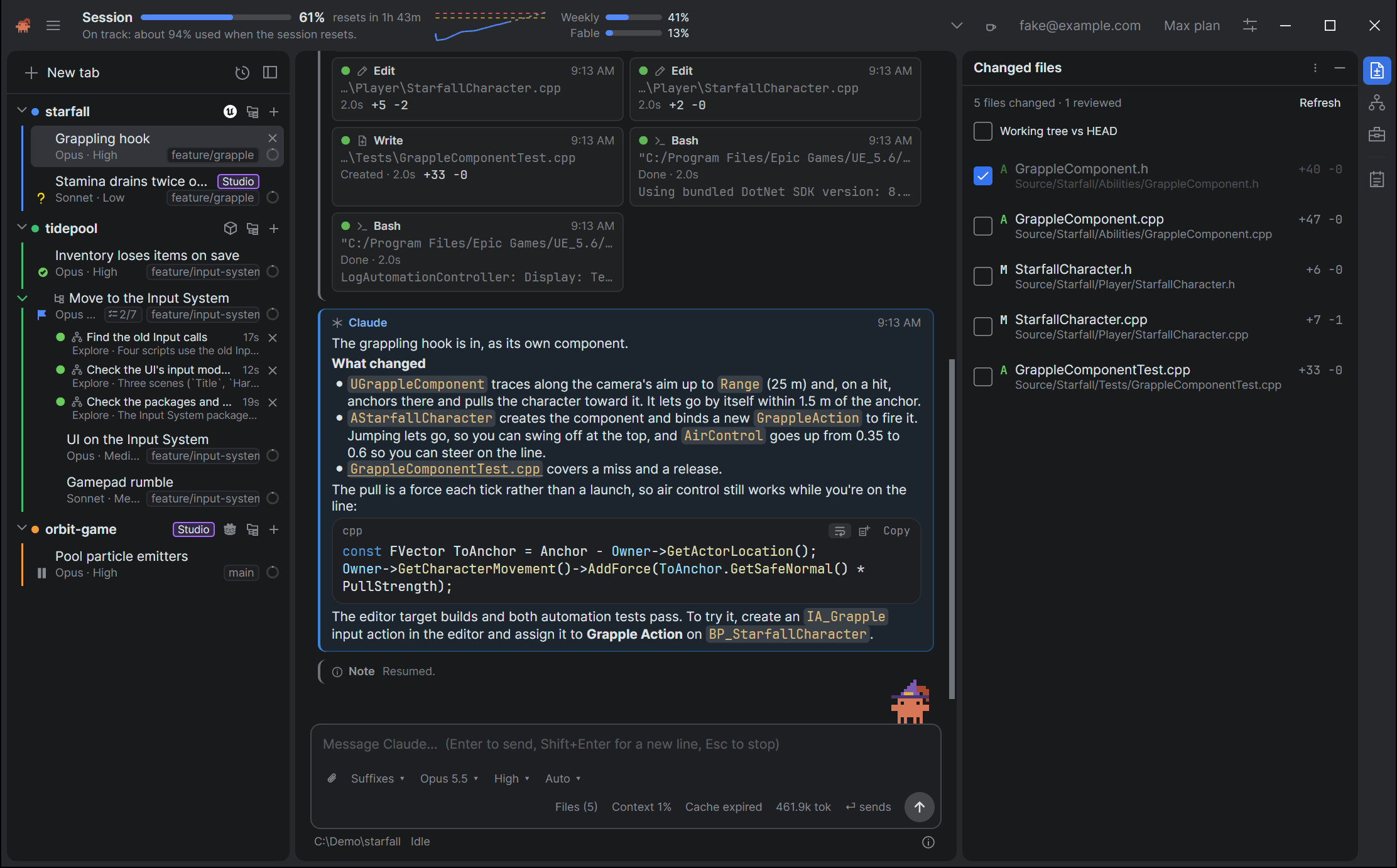
The cards
Every step is a card: a stripe down its left edge in the card’s color, over a faint tint of it, inside a thin outline. The card always names its kind in words, so the color is never the only clue.
A card’s header line has an icon, the kind in the card’s color, a few muted words (a Tool calls card says 4 calls · 1 running), and its time at the right. While you point at a card, or move the keyboard focus onto it, its buttons appear before the time: Copy message, Add to scratch pad and ⋯. Short cards, such as a note or the Turn card, put the step on the header line.
| Card | What it is | Standard | Claude style |
|---|---|---|---|
| You | Your message, or one naming what sent it: Automatic check-in, From the thread Plan | Magenta | Warm gray |
| Claude | A reply | Blue | Claude’s orange |
| Tool calls | A run of tool calls as tiles (Tool calls) | Neutral | Neutral |
| Thinking, Hook, Note | Claude’s thinking, hook runs and notices (Thinking, notes and hooks) | Neutral | Neutral |
| A subagent, named by its type | A helper Claude started (Subagents) | Neutral | Neutral |
| Modified files | The files a turn changed | Green | Blue |
| Turn, Tasks | A turn’s statistics, and where Claude’s task list stands (The end of a turn) | Slate | Warm slate |
| Permission, Question, Plan, Input requested | Waiting for you | The caution colors | Warm tints of the accent |
| Error, Warning | Something went wrong, or nearly | Red, amber | Red, amber |
The Claude style is Settings → Appearance → Style. Styles and themes shows both.
Times
A message’s time is on its card, at the right of the header line. It is short: 14:05 today, Mon 14:05 in the week before, otherwise the date and time. Hover it for the full date.
A message in a restored tab shows the time Claude Code recorded for it. A message with no recorded time shows none, rather than the time it was restored.
Following new output
The conversation scrolls to follow new output. Scroll up, with the wheel, the scroll bar, the keys or a swipe, and it stops following, so it never pulls you back down while you read. A Jump to latest button appears at the bottom right. Click it, or press Ctrl/Cmd+F4, to go to the end and follow again.
Quieter in-between steps
The steps on the way to an answer are less important than the answer. With Quieter in-between steps on, tool calls, thinking, subagents, hook runs that didn’t fail, notes, answered prompts, a turn’s statistics, and a reply Claude carried on after (one followed by a tool call in the same turn) lose their card’s tint and outline and keep the stripe. Pointing at one, or moving the keyboard focus onto it, brings them back. In the Standard style their text is a little softer too.
Your messages, Claude’s answers, changed files, errors and prompts waiting for you always keep their full look.
Indent your messages
Every card starts at the same edge until you choose otherwise. Two settings in Settings → Conversation move some of them in, and each works without the other:
- Indent your messages starts your messages’ cards far in from the left, with Claude’s replies at the left edge, so you can tell whose turn a card is from its place alone, as you can in a chat, without reading its label.
- Indent Claude’s steps starts Claude’s thinking, tool calls and subagents a little in from its replies, so the replies stand out.
Every card still ends at the same right edge.
Wide windows
In a wide window the conversation and the message box stop at a width that is easy to read, in the middle. Turn on Full-width conversation to let them fill the tab.
Long conversations
A long conversation, such as a restored session with thousands of tool calls, costs no more to show than a short one, and tabs in the background cost almost nothing.
Settings
| Setting | Default | Where |
|---|---|---|
| Quieter in-between steps | On | Settings → Conversation |
| Indent your messages | Off | Settings → Conversation |
| Indent Claude’s steps | Off | Settings → Conversation |
| Full-width conversation | Off | Settings → Appearance |
| Show thinking expanded | Off | Settings → Conversation (Thinking, notes and hooks) |
| Conversation font, Conversation font size, Code font, Code font size | The defaults | Settings → Appearance (Styles and themes) |
Shortcuts
| Action | Shortcut |
|---|---|
| Jump to the latest | Ctrl/Cmd+F4 |
Finding your way has the rest.
See also
- Finding your way for the marks in the scroll bar,
F3andF4, and find. - Copying and quoting for the buttons on a card.